こちらは構築動画です。
動画と一緒に手を動かしてみてください。
たくさん手を動かすことでコツを掴めます!
動画で紹介しきれていない機能もあるので各自で色々触ってみてくださいね!
⚠️ヘッダー、メインビジュアル、フッターはカスタマイズの方で設定しますのでこちらの動画ではそれ以外の構築になります!
⚫︎設定
⚫︎基礎
参考サイトはこちら↓
https://drive.google.com/file/d/11ilu2kNmfP53O96P12I8Fe8Fkl3J7KWo/view?usp=drive_link
①
②
⚫︎応用
参考サイトはこちら→https://drive.google.com/file/d/1qZeXZ1ohsEo9gSutmY1ONM4WeKB-hRX2/view?usp=drive_link
⚫︎Contact form7 の設定方法
(以下はコードが得意な方は飛ばしてもらって大丈夫です!)
Contactform7について、コードの記載をしますが必ずしもこれ通りにしなければいけないというものではありません。大変有名で人気のプラグインですので調べればたくさんのコード、実装方法が出てきますのでそちらを使っていただいても大丈夫です!
STEP.1
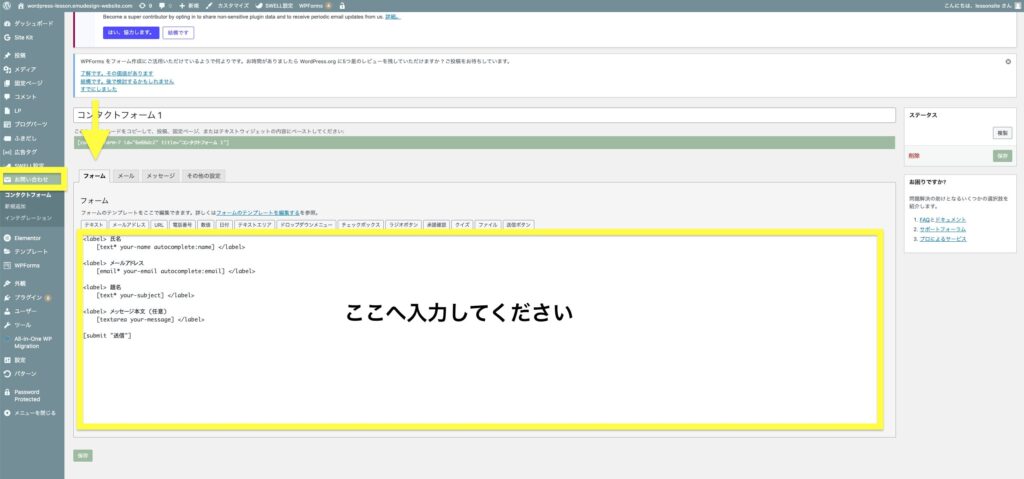
まずcontactform7のプラグインを有効化してください。
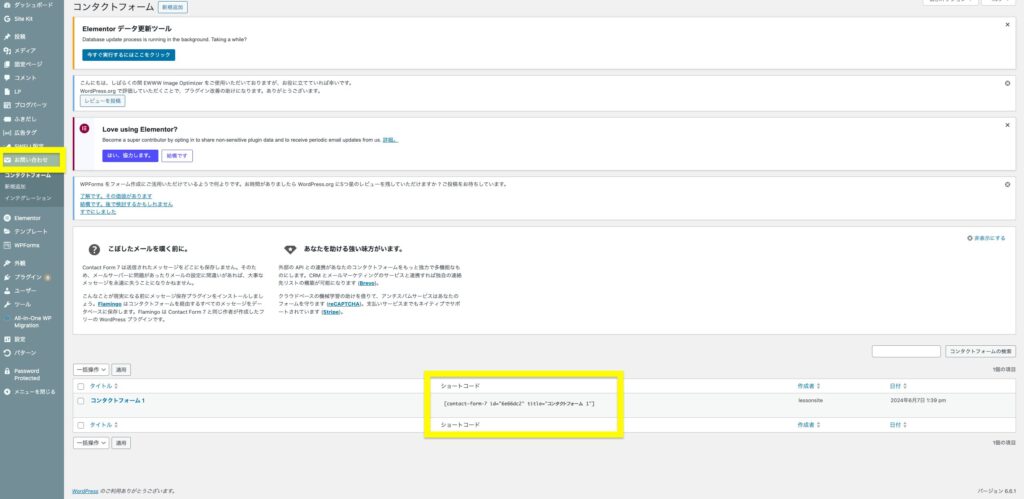
お問い合わせ▶︎フォーム
へ以下を貼り付けてください。
<div class="cf7">
    <dl class="cf7__list">
        <dt><span class="cf7__optional">必須</span>お名前</dt>
      <dd>[text* your-name placeholder "山田 花子"]</dd>
      <dt><span class="cf7__optional">必須</span>ふりがな</dt>
      <dd>[text* your-furigana placeholder "やまだ はなこ"]</dd>
      <dt><span class="cf7__optional">必須</span>メールアドレス</dt>
      <dd>[email* your-email placeholder "example@example.com"]</dd>
      <dt><span class="cf7__optional">必須</span>電話番号</dt>
      <dd>[tel* your-tel placeholder "000-0000-0000"]</dd>


            <dt><span class="cf7__optional">必須</span>ご相談内容</dt>
            <dd>[checkbox* checkbox-951 use_label_element "ホームページ制作" "名刺制作" "ロゴ制作" "その他"]</dd>


      <dt><!--<span class="cf7__optional">必須</span>-->備考欄<br></dt>
      <dd>[textarea your-message 40x20]</dd>

    </dl>


    <div class="cf7__button">[submit "送信する"]</div>
<style>
.privacy p {
    text-align: center;
}
.privacy {
    margin-bottom: 10px;
}
.privacy span.wpcf7-list-item-label {
    border-bottom: 1px solid;
}
.cf7 {
    padding: 70px;
    background: #DBDBDB;
    color:#333;
}
.cf7 h2 {
    color: #333;
    font-size: 17px !important;
}
span.caution {
    font-size: 12px !important;
    font-weight: normal;
}
.cf7 p {
    font-family: serif;
    letter-spacing: 0.05em;
}

  .cf7__list {
    display: flex;
    flex-wrap: wrap;
    margin-bottom: 60px;
  }

  .cf7__list dt:nth-of-type(n + 2),
  .cf7__list dd:nth-of-type(n + 2) {
    margin-top: 30px;
  }

  .cf7__list dt {
    width: 35%;
    padding-top: 15px;
  }

  .cf7__list dd {
    width: 65%;
  }

  /* 必須・任意 */
   .cf7__required,.cf7__optional {
    margin-right: 15px;
    padding: 6px 10px;
    color: #fff;
    font-size: 10px;
    vertical-align: 1px;
border-radius: 0px;
}

  .cf7__required {
    background: #333;
  }

  .cf7__optional {
    background: #333;
    color:#fff;
  }

  /* input・textarea */
  .cf7__list dd input[type="text"],
  .cf7__list dd input[type="tel"],
  .cf7__list dd input[type="email"],
  .cf7__list dd textarea {
    width: 100%;
    padding: 15px 20px;
    background: #FFF;
border-radius: 0px;
  }

  /* ドロップダウンメニュー */
  .cf7__select {
    position: relative;
  }

  .cf7__select:before {
    position: absolute;
    top: 50%;
    right: 20px;
    z-index: 10;
    transform: translateY(-50%);
    width: 0;
    height: 0;
    border-top: 8px solid #000;
    border-right: 6px solid transparent;
    border-left: 6px solid transparent;
    pointer-events: none;
    content: '';
  }

  .cf7__select select {
    width: 100%;
    padding: 19px 20px;
    background: #FFF;
    color: #a5a5a5;
    -webkit-appearance: none;
       -moz-appearance: none;
            appearance: none;
  }

  /* チェックボックス・ラジオボタン */
  .cf7__list dd .wpcf7-checkbox,
  .cf7__list dd .wpcf7-radio {
    display: block;
    padding: 15px 0 10px;
  }

  /* 縦並び(チェックボックス・ラジオボタン) */
  .cf7__list dd .wpcf7-list-item {
    display: block;
    margin: 0;
  }

  .cf7__list dd .wpcf7-list-item:nth-child(n + 2) {
    margin-top: 18px;
  }

  /* マウスカーソル(チェックボックス・ラジオボタン) */
  .cf7__list dd .wpcf7-list-item label {
    cursor: pointer;
  }

  /* チェックボックス・ラジオボタン */
  input[type="checkbox"],
  input[type="radio"] {
    position: relative;
    width: 18px;
    height: 18px;
    margin-right: 8px;
    border: 1px solid #fff;
    background-color: #fff;
    vertical-align: -3px;
    cursor: pointer;
    -webkit-appearance: none;
       -moz-appearance: none;
            appearance: none;
  }

  /* チェックボックス */
  input[type="checkbox"]:checked {
    border: 1px solid #000;
    background: #000;
  }

  input[type="checkbox"]:checked:before {
    position: absolute;
    top: 2px;
    left: 5px;
    transform: rotate(50deg);
    width: 6px;
    height: 10px;
    border-right: 2px solid #fff;
    border-bottom: 2px solid #fff;
    content: '';
  }

  /* ラジオボタン */
  input[type="radio"] {
    border-radius: 50%;
  }

  input[type="radio"]:checked:before {
    position: absolute;
    top: 50%;
    left: 50%;
    transform: translate(-50%, -50%);
    width: 9px;
    height: 9px;
    border-radius: 50%;
    background: #000;
    content: '';
  }


  /* プレースホルダー */
  /* Google Chrome / Safari / Mozilla Firefox / Opera */
  .cf7__list dd input[type="text"]::placeholder,
  .cf7__list dd input[type="tel"]::placeholder,
  .cf7__list dd input[type="email"]::placeholder,
  .cf7__list dd textarea::placeholder {
    color: #a5a5a5;
  }

  /* Microsoft Edge */
  .cf7__list dd input[type="text"]::-ms-input-placeholder,
  .cf7__list dd input[type="tel"]::-ms-input-placeholder,
  .cf7__list dd input[type="email"]::-ms-input-placeholder,
  .cf7__list dd textarea::-ms-input-placeholder {
    color: #a5a5a5;
  }

  /* Internet Explorer */
  .cf7__list dd input[type="text"]:-ms-input-placeholder,
  .cf7__list dd input[type="tel"]:-ms-input-placeholder,
  .cf7__list dd input[type="email"]:-ms-input-placeholder,
  .cf7__list dd textarea:-ms-input-placeholder {
    color: #a5a5a5;
  }

  /* 送信ボタン */
  .cf7__button {
    padding-left:0px;
    text-align: center;

  }

  input[type="submit"] {
    width: 260px;
    height: 60px;
    background: #fff;
    color: #000;
    transition: opacity .6s;
    border-radius:0;
  }

  input[type="submit"]:hover {
    opacity: .6;
  }

  /* ajax-loader */
  .wpcf7-spinner {
    vertical-align: middle;
  }
.wpcf7-spinner {
  display: none!important;
}

  @media screen and (max-width: 767px) {
.privacy p {
    font-size: 14px;
    /* text-align: center; */
}
.cf7{
padding: 30px;
}
.cf7 h2 {
    margin-top: 20px;
margin-bottom: 10px;
}

    .cf7__list dt {
      width: 100%;
      margin-bottom: 15px;
      padding-top: 0;
    }

    .cf7__list dd {
      width: 100%;
    }

    .cf7__list dd:nth-of-type(n + 2) {
      margin-top: 0;
    }

    .cf7__list dd .wpcf7-checkbox,
    .cf7__list dd .wpcf7-radio {
      padding: 0;
    }

    /* 送信ボタン */
    input[type="submit"] {
      width: 180px;
      height: 56px;
    }

  }
  </style>
STEP.2
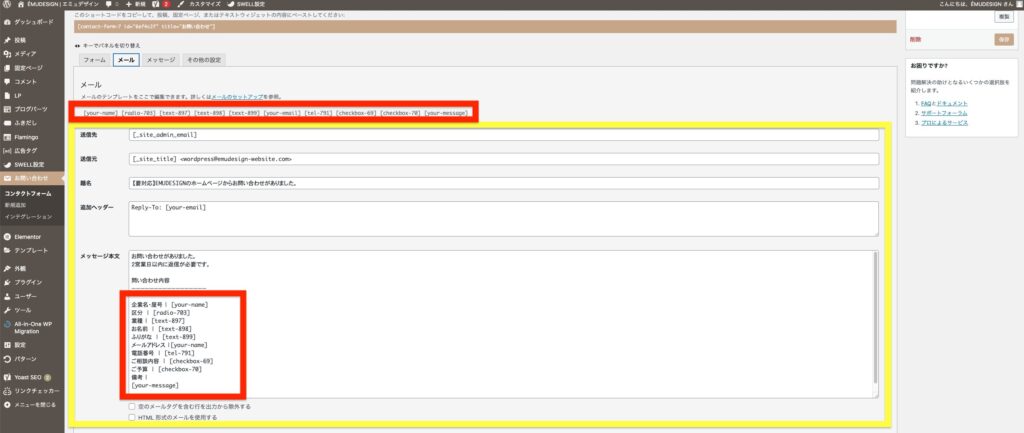
お問い合わせ▶︎メール
こちらはお問い合わせがあった時にメールがくる設定です。
添付画像を参考に入力してみてください。
送信元
題名
メッセージ本文
を入力していきます。
⚠️メッセージ本文に関して、上の赤枠に記載のもの([radio-703]など)は下の赤枠にも必ず記載してください!
ここまで設定できましたら、このお問い合わせフォームを設置したい固定ページの編集へいき、
ウィジェットの”ショートコード”があるのでそちらに該当のショートコードを貼り付けて完成です!